Font for LED Display: A Guide to Readable and Impactful Typography
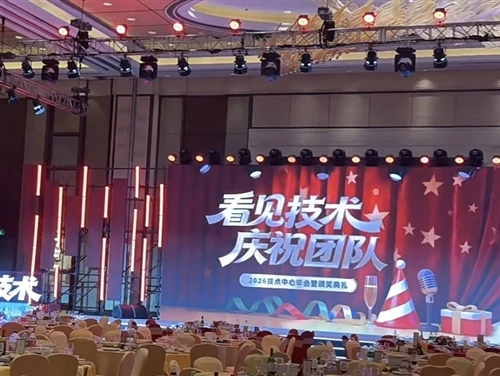
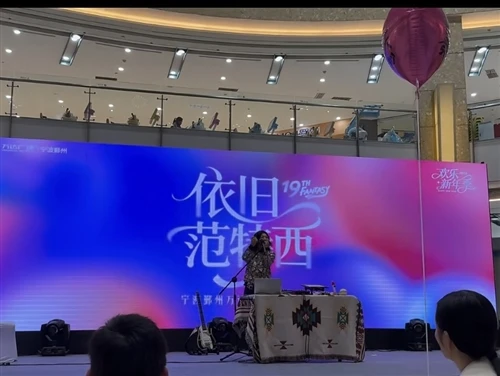
When designing content for an LED screen, the choice of typeface is as critical as the image quality. The core question is: how do you ensure your message is legible from the intended viewing distance and under varying lighting conditions? A poor font for LED display can make even high-resolution content look unprofessional or difficult to read. This guide covers the principles of selecting an effective font for your screen.
Why Font Choice Matters on LED Displays
LED displays function differently from printed media or standard monitors. Each character is formed by a grid of pixels, and the font design directly impacts how clearly that pixel grid forms recognizable shapes. A font that is too thin or decorative may break apart visually, especially on screens with a larger pixel pitch. Conversely, a well-chosen font for LED display ensures that every letter is distinct and legible.
Key Typographic Characteristics
Several properties define a suitable font for an LED display. These include stroke weight, x-height (the height of lowercase letters relative to capital letters), and letter spacing. Sans-serif fonts are generally preferred because the absence of small decorative strokes (serifs) reduces visual clutter at small sizes or long distances.
Recommended Font Types for Different Scenarios
Not every font works well in every situation. Below is a breakdown of font categories and their typical appropriateness.
| Font Category | Examples | Best Use Case | Characteristics |
|---|---|---|---|
| Sans-Serif | Arial, Helvetica, Roboto | General signage and text-heavy content | Clean, legible, versatile |
| Bold Condensed | Impact, Arial Black | Headlines and short phrases | High visibility, space-efficient |
| Monospaced | Courier, Consolas | Technical data or timetables | Consistent spacing, useful for numeric data |
| Decorative/Display | Script, hand-drawn styles | Logos or very short artistic titles | Use sparingly; often hard to read at distance |
| Pixel-Optimized | LED fonts (custom) | Low-resolution or large-pitch screens | Designed specifically for pixel grids |
Factors to Consider When Choosing a Font for LED Display
Selecting the right typeface involves evaluating your specific display and environment.
Pixel Pitch and Resolution
The pixel pitch of your screen determines how much detail can be rendered. For a screen with a larger pitch, a bold, simple font with thick strokes is essential. For a fine-pitch screen, you have more flexibility to use lighter fonts because the pixel grid is finer and capable of rendering curves smoothly.
Viewing Distance
The distance between the viewer and the screen is a major factor. As a general rule, for every meter of viewing distance, the font height should be a certain size to remain readable. For example, text intended to be read from 10 meters away should be significantly larger than text intended for close desktop viewing. Testing your font at the actual viewing distance is the most reliable method.
Background and Contrast
A font for LED display does not exist in isolation. The contrast between the font color and the background affects legibility. Dark text on a light background generally performs well in bright conditions, while light text on a dark background is often better for dimly lit environments. Additionally, avoid overly similar colors that reduce contrast.
Text Case and Content Length
ALL CAPS text tends to be less readable for long paragraphs but can be effective for short headlines. For body text, sentence case or title case is generally easier for the eye to scan. Also, consider the content length; a long block of text requires a different font size and leading (line spacing) than a short slogan.
Common Mistakes to Avoid
Several typographic errors can compromise the effectiveness of your LED display.
Using Script or Italic Fonts Extensively: These styles reduce legibility at distance.
Insufficient Line Spacing: Lines that are too close together can merge visually on screen.
Overly Thin Font Weights: Light or thin fonts may appear broken or dim, especially on outdoor screens.
Ignoring Color Intensity: Some font colors appear brighter than others; yellow and green are often perceived as brighter than blue or red.
Content Design Best Practices
Designing for an LED screen requires a slightly different approach than for print or standard monitors. For text content, it is generally recommended to keep each message short and to the point. The audience typically has limited time to absorb information. Use a clear hierarchy: headlines should be bold and large, while subtext can be smaller. Also, ensure that your text is placed within the safe viewing area of the screen, away from edges or bezels.
Summary and Practical Recommendations
Choosing the right font for LED display is about prioritizing legibility over style. Sans-serif, bold fonts with good contrast against the background are the safest and most effective choice for most applications. Always consider your screen's pixel pitch, the intended viewing distance, and the ambient lighting conditions. It is highly advisable to create a sample of your text content and view it on the actual screen (or a similar model) before finalizing your design.
Frequently Asked Questions
Q1: What is the most common font for LED display signage?
A: Sans-serif fonts like Arial, Helvetica, and Roboto are widely used due to their simple, clean shapes. Bold versions of these fonts are particularly common for outdoor and long-distance applications.
Q2: How do I choose the font size for my LED screen?
A: A rough rule is that the font height (in mm) should be at least one-third of the viewing distance (in meters). For example, for a 10-meter viewing distance, a font height of approximately 30mm may be acceptable, though this varies by font weight and screen brightness.
Q3: Can I use colored fonts on an LED display?
A: Yes. However, keep in mind that some colors have different brightness levels to the human eye. White and yellow are generally highly visible, while blue may appear dimmer. Ensure sufficient contrast with the background.
Q4: Does the font look different on an outdoor LED display?
A: Yes, outdoor LED screens often have a larger pixel pitch, which makes thin strokes appear jagged or broken. Bold, simple fonts are strongly recommended for outdoor screens.
Q5: What software can I use to design text for an LED display?
A: Most users create content in standard graphic software like Adobe Photoshop, Illustrator, or using content management systems (CMS) provided by the LED screen manufacturer. The key is to export at the screen's native resolution.